Android L - The Next Android Version


Android L is the next android version to be released after Kitkat. Still "L" is a code-name. The "L" can be changed into another food like 'Ice Cream Sandwich', 'Jellybean' or 'KitKat'. It will have many new features and user friendly interface than previous versions. There are lots of things to tell about it and lets see it.

Preview

Google has released developer preview of Android L for Nexus Mobile Series. If you have an Nexus you can taste it (at your own risk).
If you want to get it go HERE

Design


Android L has a new user interface. Google named it as "Material Design". It is Simple, User Friendly, Clear, Wonderful and New. The real meaning of "Material Design" is both 2D and 3D (flat and 3D).

New Navigation Bar

Android L has a New and Nice Soft-button Style on navigation bar.

Old Navigation Bar


New Navigation Bar


Performance

#New Android Run-time (ART)

The 4.4 release introduced a new, experimental Android run-time, ART. Under 4.4, ART was optional, and the default run-time remained Dalvik. With the L Developer Preview, ART is now the default run-time.
  • Ahead-of-Time (AOT) compilation
  • Improved garbage collection (GC)
  • Improved debugging support
Most Android apps should just work without change under ART. However, some techniques that work on Dalvik do not work on ART. Pay particular attention if:
  • Your app uses Java Native Interface (JNI) to run C/C++ code.
  • You use development tools that generate non-standard code (such as some obfuscators).
  • You use techniques that are incompatible with compacting garbage collection.

#lockscreen Notifications

  • PRIVATE. - Shows basic information, hides the notification’s full content.
  • PUBLIC. - Shows the notification’s full content.
  • SECRET. - Shows nothing, excluding even the notification’s icon.
Some of the major new features are:Lockscreens in the L Developer Preview have the ability to present notifications. Users can choose via Settings whether to allow sensitive notification content to be shown over a secure lock-screen.
Your app can control the level of detail visible when its notifications are displayed over the secure lock-screen.

For More Info Go HERE

Android WiFi Crack/Hack Toolkit "dSploit"


dSploit is an Android network analysis and penetration suite which aims to offer to IT security experts/geeks the most complete and advanced professional toolkit to perform network security assessments on a mobile device. Once dSploit is started, you will be able to easily map your network, fingerprint alive hosts operating systems and running services, search for known vulnerabilities, crack logon procedures of many tcp protocols, perform man in the middle attacks such as password sniffing ( with common protocols dissection ), real time traffic manipulation, etc .

##Features

#WiFi Cracking

The WiFi scanner will show in green access points with known default key generation algorithms, clicking on them allows you to easily crack the key, supported models: Thomson, DLink, Pirelli Discus, Eircom, Verizon FiOS, Alice AGPF, FASTWEB Pirelli and Telsey, Huawei, WlanXXXX, JazztelXXXX, Wlan_XX, Ono ( P1XXXXXX0000X ), WlanXXXXXX, YacomXXXXXX, WifiXXXXXX, Sky V1, Clubinternet.box v1 and v2, InfostradaWifi.


#RouterPWN


Launch the http://routerpwn.com/ service to pwn your router.


#Trace


Perform a traceroute on target.


#Port Scanner


A syn port scanner to find quickly open ports on a single target.


#Inspector


Performs target operating system and services deep detection, slower than syn port scanner but more accurate.


#Vulnerability Finder


Search for known vulnerabilities for target running services upon National Vulnerability Database.


#Login Cracker


A very fast network logon cracker which supports many different services.


#Packet Forger


Craft and send a custom TCP or UDP packet to the target, such as Wake On LAN packets.


#MITM


A set of man-in-the-middle tools to command&conquer the whole network.


Simple Sniff


Redirect target's traffic through this device and show some stats while dumping it to a pcap file.


#Password Sniffer


Sniff passwords of many protocols such as HTTP, ftp, imap, imaps, irc, msn, etc from the target.


#Session Hijacker


Listen for cookies on the network and hijack sessions.


#Kill Connections


Kill connections preventing the target to reach any website or server.


#Redirect


Redirect all the HTTP traffic to another address.

#Replace Images


Replace all images on webpages with the specified one.

#Replace Videos


Replace all YouTube videos on webpages with the specified one.


#Script Injection


Inject a java script in every visited webpage.

#Custom Filter


Replace custom text on webpages with the specified one.


##Requirements-

  • Your device must have an ARM CPU. 
  • An Android device with at least the 2.3 ( Gingerbread ) version of the OS. 
  • The device must be rooted. 
  • The device must have a BusyBox full install, this means with every utility installed (not the partial installation).

##Download - dSploit

  DOWNLOAD - Latest Stable Version (recommended)
DOWNLOAD - Experimental Version

##Other -


Support the Developers If you can
 

WiFi Password Hack 2014 - Wifi Password Cracker - WiFi Hack


WiFi Password Hack 2014 | WiFi Hack 2014

       This year, we bring to you the best software package to hack any WiFi network in 2014.
The compilation includes powerful encryption software in network
detection and ideal for hacking WiFi networks.
    
Need free WiFi?
WiFi password hack 2014 is an amazing software for everyone. If you want to hack WiFi, you can get any type of encryption WiFi network just press the button. WEP, WPA, WPA2 or whatever it's no match for WiFi Password Hack.

Does it work?
It certainly does! WiFi Password Hack was put together by a group of qualified people. Call them hackers or whatever you like, but they know what they're doing! 

Is it really free?
Most definitely. The program comes to you at no cost! So what are you waiting for?Download WiFi Password Hack today and gain the ability to hack into any WiFi network you like!

Support All Platforms All In One WiFi Hack:


WiFi Hack WEP, WPA, WPA2, WiFi Hack Windows XP, WiFi Hack Windows Vista, Windows 7, WiFi Hack Windows 8.1, WiFi Hack Android, WiFi Hack iPhone, etc

This is all in one WiFi Password Hack package contains:

WireShark,AirSnare, WirelessKeyView, WiFi Monster, NetStumbler, EasyWifiRadar
SmartSniff, Ettercap, WinPcap, CommView, Nmap, Wirelessmon, PocketWarrior, Inssider,
RemoteAnyWhere, PmoniPacketMon, ApTools, WiFiFoFum, Advanced Port Scanner,
NetSurveyor


PDFs & Tutorials:
Hacking Wireless Networks,Cracking WEP and WPA WiFi, WiFi Hacking, Hacking Asus WL520gU,
BackTrack PDFs,WiFi Advanced Fuzzing, WiFi Security, Wireless Sniffing, WiresHark,
Wireless Hacking Tools

Bonus Softwares:

Net Tools,WepGen,Cantennator,Anchorfree,Cain and Abel,All Wifi Drivers,Brutus,
VmWare Keygen,LanHelper,AND MANY MORE!!!

Amazing Wifi Hacker tools can provide free wireless signal wherever you want. Wifi Password Hack 2014 tools were developed new technology that is currently very popular.
Amazing Wifi Hacker tools can provide free wireless signal wherever you want

WiFi Password Hack 2014

WiFi Password Hack 2014

File Size: 163,53 MB
This is a portable version
Just Install the setup file


Wifi Hack is very simple hacking your neighbors or anyone else's

Untitled form

Untitled form

Please give your comments on my blog and your problems
    This is a required question
    This is a required question
    This is a required question
    This is a required question
    This is a required question
Edit this form

Download android apps (APK) to your PC

When you install an android app trough Play Store it installs only on your phone. But now you can download APK files of Apps and use them to install apps on any android device.

1# Step one - Click Here

2# Step two - Paste the play store URL of an app


3# Step Three - Press "Generate Download Link" button.

4# Step Four - Download

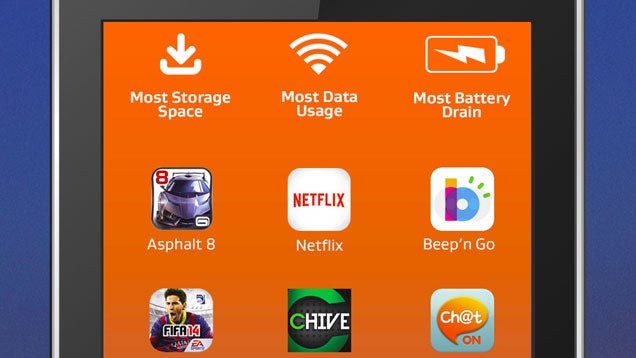
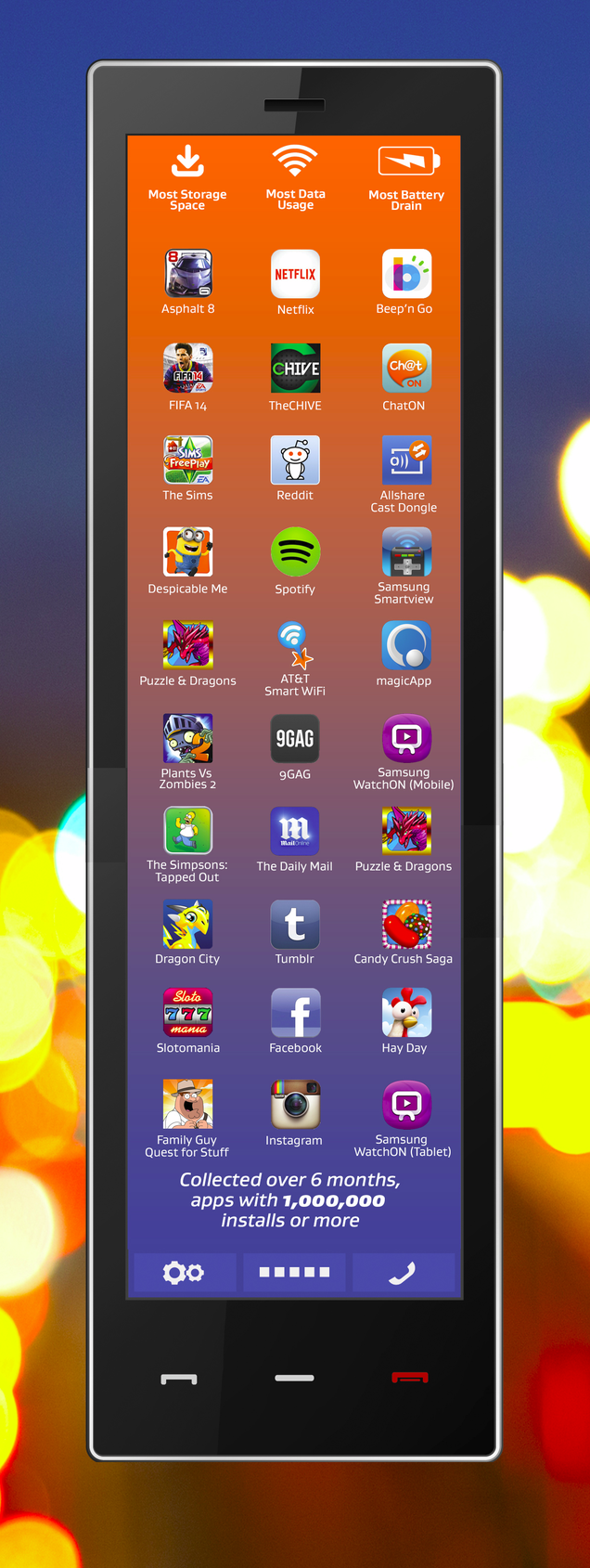
The Popular Android Apps That Hog the Most Battery, Data, and Storage

The Popular Android Apps That Hog the Most Battery, Data, and Storage
It's no secret that many apps are terrible for your phone's
The Popular Android Apps That Hog the Most Battery, Data, and Storage performance. If you want to know which ones are the worst, 
take a look at this study from AVG, which highlights the Android 
apps that drain your battery most,take up the most storage space,
and use up the most data.

AVG collected real usage data over six months for all the Android apps with one million or more installs. Many of these are pretty obvious—of course Netflix uses a huge amount of data and games take up the most storage space. 

Some are less intuitive, however. Why is AT&T's Smart Wi-Fi tool hogging cellular data connections? What is Candy Crush Saga doing to drain your battery life? (That one we know, actually. Free, ad-supported apps are the vampires of the app world.)

Here's AVG's top 10 for each of the categories. (ZDNet offers the info in tables with additional details on the apps.)
The Popular Android Apps That Hog the Most Battery, Data, and Storage

For information on the battery, data, and storage usage of the apps you've installed on your phone, AVG recommends using their new AVG Cleaner for Android, of course.


Are your favorite apps among the worst performance hogs? AVG 

How to Watch and Download Youtube Videos without Any Software or Proxy

#1-Search the Video on Google
#2-Open the link.


#3-Now Change www.youtube.com with playit.pk


Enjoy the Video!
Please Leave a comment,
Thanks.

The 23 Blog Directories To Submit Your Blog

Gaining exposure for your blog is critical to building a following and revenue. After creating compelling copy, titles, descriptions and link strategies, it’s time to list your blog in one or more directories.
There are many paths to building links, such as link baiting or blogroll-link swapping, but few are as easy to implement and cost effective as submitting to blog directories. And good link juice makes for a growing blog.
Here are 23 directories you need to know about:

1. Best of the Web Blog Search remains a powerful tool for sharing your blog, especially since this director’s very selective, listing only mature and valuable blogs. A link from here is majestic.

2. Bloggeries is one of the most respected blog directories. The layout is clear and concise, and readers are able to find what they are looking for in a snap.

3. EatonWeb Blog Directory is a powerful list. The fee, currently $34.99, pays for a review of your blog.

4. OnToplist.com is a free, manually-edited directory that reads the RSS feed of your blog. You can also use the site’s social features, article directory, and other great tools to build your blog.

5. Blogged.com is an interesting mix of a directory and a Google News type site that is fed by the blogs listed with Blogged. And it’s free to list your blog.

6. While the design and infrastructure have changed somewhat over the years, Blog Search Engine remains one of the most selective blog directories on the web. Membership has its privileges.

7. Blog Catalog features a vast number of categories, from “academic” to “writing”, while offering the ability to search by country, language or user. It has a no-frills design, but offers convenient access through a simple blog registration.

8. Globe of Blogs has too many features to list. Only non-commercial blogs are accepted. The site may be busy, but I like being able to narrow my search by title, author or subject.

9. The ultimate directory of British blogs isn’t focused on location, but on the culture. It is asked that bloggers be genuinely “Britished.”

10. Blog Universe has a layout that’s easy to navigate and, although the content is limited, it’s an all-around good directory worthy of submission.

11. Bigger Blogs is intertwined with a business directory and an article directory, giving you access to several powerful tools in one location.

12. Bloggernity is a crisp, clean and easily navigated site. It’s low ad-to-content ratio has helped solidify its reputation as a quality directory.

13. Bloggapedia has an interesting and eye-catching homepage. Readers are easily connected to top blogs and new posts. Innovative categories, a colorful design and its blogger tool kit make this directory a hit.

14. Spillbean is a well-designed directory with categories such as “health,” “society,” “Internet,” and “personal.”

15. Blogging Fusion boasts over 60 categories, including family-focused blogs. Blogging Fusion has an good number of listings, and it also has visitor stats.

16. Blogflux is organized and clear with a strong social element.

17. The blogs at the top of Bloglisting are fun, colorful and catch the attention of the reader. Bloglisting displays the page-ranking blogs, which is a helpful tool when determining with whom you want to exchange links.

18. Blogio stores plenty of quality blogs, and it sports solid on-site search.

19. Blog Digger is a strong search tool, especially for local blog listings.

20. Blog Pulse features a powerful community element, on-site analytics, and a clean design. The “submit” page is a bit tricky to find, so here’s the quick link.

21. Technorati’s blog directory is well-respected and spans more than 30 categories.

22. Blogarama has a strong base of blogs and a solid text-ad system for its front page.

23. Blog Hints features over 100 categories. The site is very picky about which blogs are included, and those that are listed are presented via a visual interface that shows the site’s design and page rank. This makes Blog Hints the perfect site for finding link-swapping partners.

The above listings are a glimpse inside the large and vast world of blog directories and the valuable inbound links that your can build for your blog and your business.

There are countless more directories at your disposal.
  Which do you like? Leave a comment

How we can enable Navigation Bar / Softbuttons on GB 2.3.7 or ICS

Hi, This is how we can enable Navigation Bar / Softbuttons on GB 2.3.7 / ICS.

Make a backup before doing this. Do it at you own risk
CM 9

#Screenshots -


Steps -
1 - You have to decompile Framework-res.apk.

2 - Open res/values/bools.xml

3 - Find this
<bool name="config_showNavigationBar">false</bool>

4 - Change it to
<bool name="config_showNavigationBar">true</bool>

5 - Then Open res/values/dimens.xml

6 - Find
<dimen name="navigation_bar_height">28.0dip</dimen>
<dimen name="navigation_bar_width">28.0dip</dimen>

7- Change it to
<dimen name="navigation_bar_height">29.0dip</dimen>
<dimen name="navigation_bar_width">42.0dip</dimen>

8 - You can change 28.0dip as You Want. (I like 28.0dip)

9 - Then recompile framework-res and Put it to Framework folder in you phone.

10 - Reboot

How to change boot splash of galaxy y.

##This method is tested and worked for me. Do This at your own risk. I'm not responsible for any damage done to your phone. But you can PM for help.
Don't test if you don't know How to unbrick.
Make a backup before do this.

You need -
Steps -

step 1 - Download

First you have to download files. Download Odinv3.zip from Dev-Host. Then find and download an Odin firmware package you need from that thread. If you don't know how to select them you can use this (http://www.hotfile.com/dl/181652297/...1_SLK.zip.html) . And SAMSUNG_USB_Driver_for_Mobile_Phones.zip. After that you have to find MultiExtractor Full Version.

step 2 - Install

Then install SAMSUNG_USB_Driver_for_Mobile_Phones.exe in the zip file.
And install MultiExtractor full version.

step 3 - Prepare your phone

After the installation turn off you phone and boot your phone into
download mode by Pressing Volume Down + Home Button + Power Button.
then confirm the message by pressing Volume UP Button
Then connect your Galaxy Y to your PC.

step 4 -

#Extract Odin v3.zip and open Odin3.exe
It shows your phone in a square


#Then click on the PDA Button

After That select S5360DDLK2_S5360ODDLK1_S5360DDLK1_HOME.tar file from where you extracted it.


#Then you can see like this


## step 5 -

#Then go to the folder which contains "S5360DDLK2_S5360ODDLK1_S5360DDLK1_HOME.tar.md 5" file.
Right click on the file.
Select Extract (MultiExtractor)


#Then press start in MultiExtractor window.


#After scanning file by MultiExtractor you can find galaxy y logo in JPG section.


#Then drag and drop a Galaxy Y logo image from MultiExtractor to any folder.


#Next, Edit the image and save it. But the edited image must not exceed the original file size. Normal file size is 30kb.
After edit drag and drop edited image to MultiExtractor and replace all galaxy y logo images. But you can't replace some images. So leave them.


##step 6 -

#Go to Odin3 window again.
Then Press start.


#you can see the progress

In you PC


And In your Phone,


contact the genuine author Kasun_kodagoda(facebook)
You can PM me for corrections and suggestions.

This method is tested on Samsung Galaxy Y. It will work for any Samsung Android Firmware. Try at you own risk.

Don't Forget to Comment
keep in mind that your comments and likes power us up for more awesome work.!!

How to unbrick an Android mobile phone.


Things That You Need:
*A Computer(Windows XP,Windows 7,Windows Vista,Windows 8)
*A USB Cable
*Properly Installed Samsung USB drivers to Connect your phone to Computer Click the Link below to download Samsung USB Drivers
http://developer.samsung.com/android...er-for-Windows
*Odin 1.84/Odin1.85 Click The Link Below to Download Odin 
http://forum.xda-developers.com/show....php?t=1262272

Disclaimer: I'm not responsible for any damage done to your phone. 

Instructions
1.Download the firmware of Your Country Click The Link Below
http://forum.xda-developers.com/show....php?t=2568853
2.Extract The Two Zip Files You Downloaded Above
3.Open Odin 1.85(Windows 7 Run as Administrator)
(Locate the Firmware files, The Zip files we extracted)
4.Click PDA - PDA_S5360_*****.tar.md5
5.Click Phone - MODEM_S5360_*****..tar.md5
6.Click CSC - CSC_S5360_******.tar.md5
7.Now turn off your Galaxy Y {Remove the battery}
8.Now attach/connect your phone to computer via USB cable.
9.Press and Hold Volume Down button+Home button+Power button for 5 Seconds
10.Now you booted up on Download mode, Press Volume Up button to Continue
11.Wait for a Yellow text to appear 
12.Click Start
13.And let ODIN do its work and wait till you see PASS in green color, it means the flashing process is completed successfully
13.You Sucessfully Flashed your phone..!!
14.Insert the battery and Boot up your phone and Enjoy..!! 

Comment for Any Problems?? Thank You

Device:Samsung Galaxy Y GT-S5360
Rom:Lenox Evolution v2.2
Kernel:Savie's kernel #54

Device:Samsung Galaxy S Duos 2 GT-S7582
Rom:Stock Jellybean 4.2.2
Kernel:Stock kernel

I will be leaving Galaxy Y forums because I got my new phone and selled my Galaxy Y even I'm waiting for the full release of CM7 and CM9
but I will still be updating this guide.
Thank you for all the xda members who helped me... 

Sent from GT-S7582 using Tapatalk 2